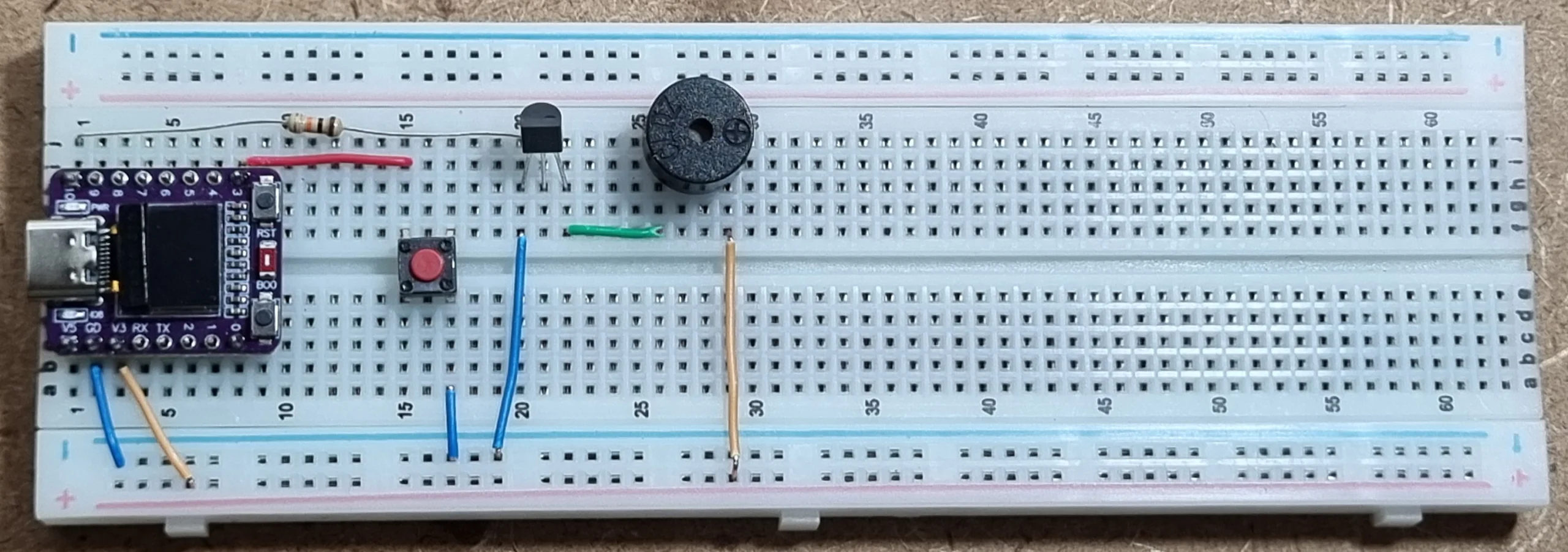
Why a Gold Price Alarm?
One day, I was looking at a gold price chart and noticed many fluctuations. I wanted to be notified of these changes so that I could buy gold at the bottom and sell it at the top. I needed a device like a gold price alarm, that checks the price at regular intervals and alerts me when the price goes above or below my target price.
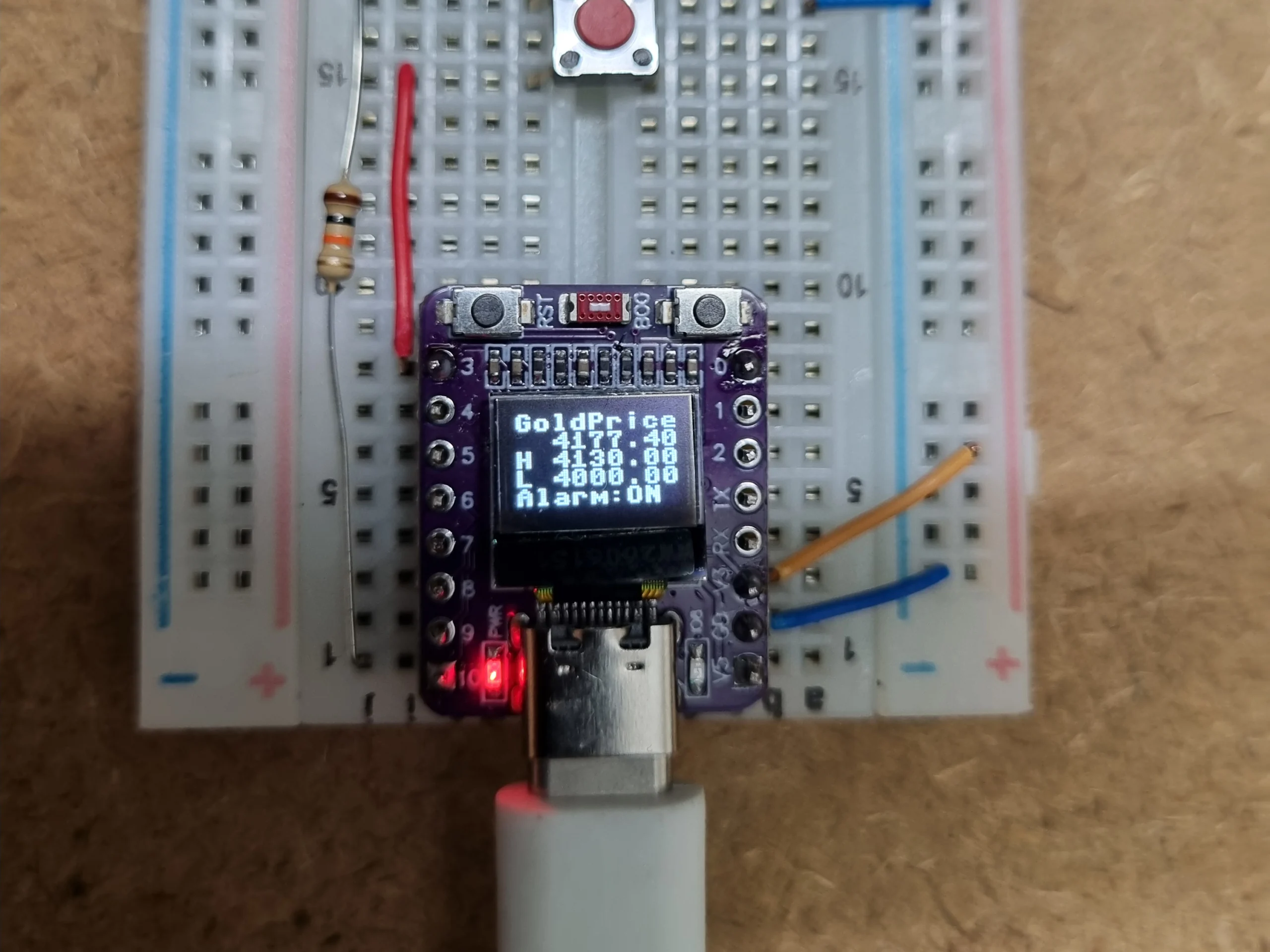
Title in Other Languages
- German: Goldpreis-Alarm ESP32-C3 0,42-Zoll-OLED-Display
- French: Alarme de prix de l’or ESP32-C3 Écran OLED de 0,42 pouce
- Spanish: Alarma de precio del oro ESP32-C3 Pantalla OLED de 0,42 pulgadas
- Italian: Allarme prezzo dell’oro ESP32-C3 Display OLED da 0,42 pollici
- Portuguese (Brazil): Alarme de Preço do Ouro ESP32-C3 Display OLED de 0,42 polegadas
Tip: Right-click anywhere on this page and choose “Translate to your language”.
Disclaimer
“This project is for educational purposes only and is not financial advice.”Why did I choose the ESP32?
The ESP32 is cheap, has built-in Wi-Fi, and works well with MicroPython, so it is a perfect choice for this project. It comes in many models and variants, so you can choose the one that fits your needs.
Introduction
In this project, we will use an ESP32-C3 to get the live gold price from a web API, process the data, and decide whether to sound the alarm.
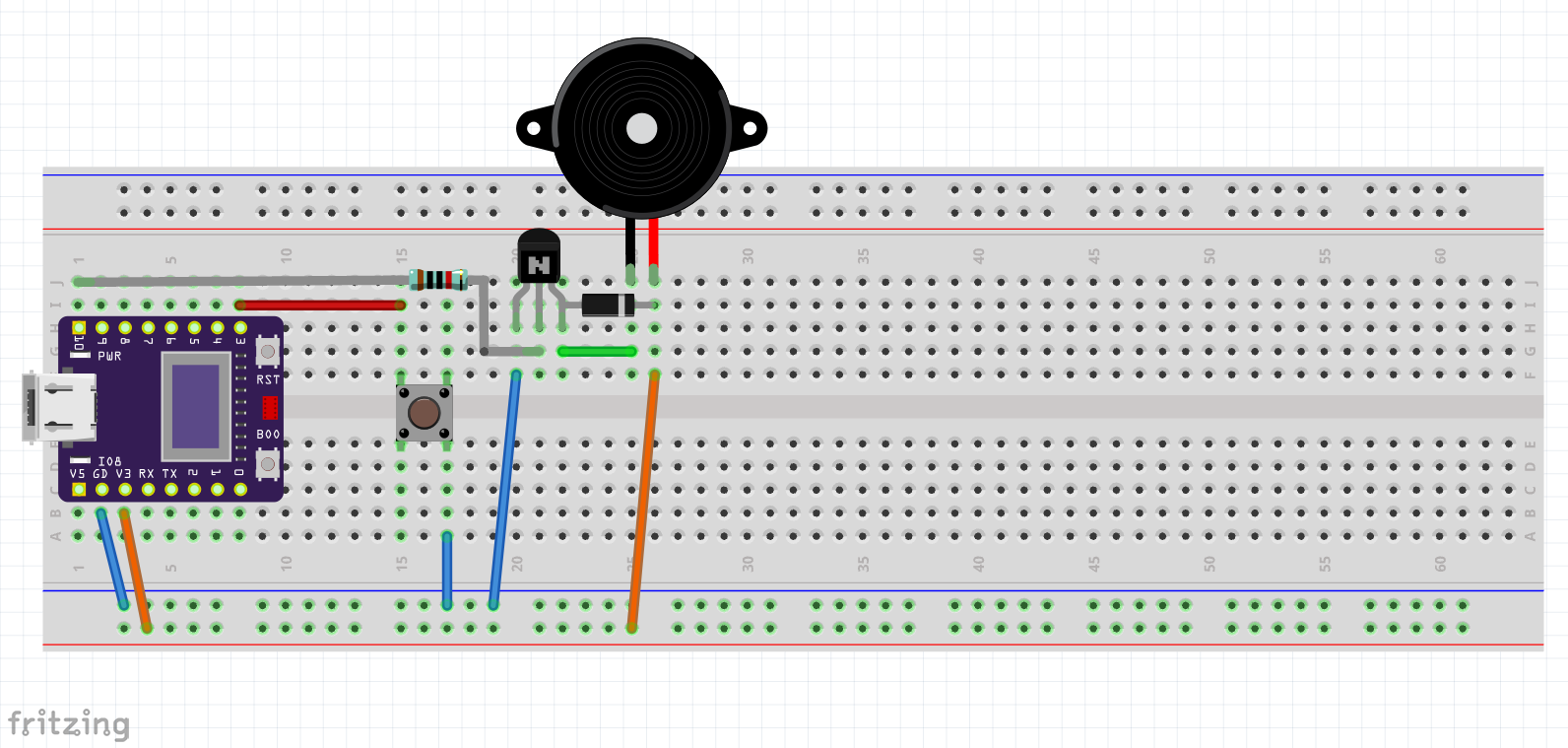
Parts list
- ESP32-C3 board with a built-in 0.42-inch OLED display (to show the live price)
- 2N2222A(plastic TO-92) NPN BJT transistor
- 3.3 V active buzzer
- Tactile switch to mute the alarm
- LED (optional). I used the built-in LED on GPIO8.
- 10 kΩ resistor for the transistor base
- Breadboard
- Wires
- Flyback diode across the buzzer (optional). It is needed only with an electromagnetic buzzer. You can use a 1N4007, 1N4148, 1N5819, or BAT42.
Pin table
| Component | ESP32-C3 pin | Notes |
|---|---|---|
| Buzzer (via 2N2222A) | GPIO10 | Drives the transistor base through a resistor |
| Mute switch | GPIO3 | Other side to GND, internal pull-up enabled (confirm this matches your code) |
| OLED SDA | GPIO5 | I²C, built into the board |
| OLED SCL | GPIO6 | I²C, built into the board |
| Built-in LED | GPIO8 | Active low on my board (confirm for yours) |
Getting the gold price
I use a free price API over HTTPS. This is the most important design decision, because free APIs have request limits and can change their terms, so check the current terms before you use it. The price is fetched from https://api.gold-api.com/price/XAU as a JSON response.

How the Code Works (Step-by-Step)
Click here to Show MicroPython code
from machine import (Pin, I2C, deepsleep, reset_cause,
                     PWRON_RESET, HARD_RESET, WDT_RESET, DEEPSLEEP_RESET, SOFT_RESET)
from time import sleep_ms, ticks_ms, ticks_diff
from Secrets import SSID, PASSWORD
import esp32
import micropython
import ssd1306
import urequests
import network
import gc

micropython.alloc_emergency_exception_buf(100)   # readable errors inside IRQs

# ---------------- Configuration ----------------
PRICE_URL = 'https://api.gold-api.com/price/XAU'
HIGH_LIMIT = 4130.0         # alarm when price >  this value
LOW_LIMIT = 4000.0          # alarm when price < this value FETCH_INTERVAL = 300000 # ms in deep sleep between price requests ALARM_DURATION_MS = 10000 # how long the alarm beeps WIFI_TIMEOUT_MS = 15000 SHORT_MAX_MS = 500 # shorter than this = short press LONG_MIN_MS = 3000 # this or longer = long press IGNORE_AFTER_MS = 300 # ignore bounce events after a press finished # ---------------- Startup info ---------------- RESET_CAUSES = { PWRON_RESET: "Power on / brownout", HARD_RESET: "Hard reset / crash", WDT_RESET: "Watchdog", DEEPSLEEP_RESET: "Wake from deep sleep", SOFT_RESET: "Soft reset", } print("Reset cause:", RESET_CAUSES.get(reset_cause(), reset_cause())) gc.collect() print("Free RAM:", gc.mem_free()) # ---------------- Hardware ---------------- i2c = I2C(0, scl=Pin(6), sda=Pin(5)) oled = ssd1306.SSD1306_I2C(72, 40, i2c) # 0.42" OLED: 9 chars x 5 lines alarm_pin = Pin(10, Pin.OUT, value=0) # buzzer or LED Button = Pin(3, Pin.IN, Pin.PULL_UP) # pressed = 0 # Deep sleep wake-up works on a level, so wake when the pin is LOW esp32.wake_on_gpio((Button,), esp32.WAKEUP_ALL_LOW) # ---------------- State ---------------- alarm_muted = False # toggled by a short press alarm_stop = False # set by a long press: end the alarm now busy = False # a button press is being handled last_end = 0 # time when the last press finished # ---------------- Helpers ---------------- def oled_print(text): """Print text on the OLED, wrapping every 9 characters (max 5 lines).""" oled.fill(0) for line in range(5): chunk = text[line * 9:(line + 1) * 9] if not chunk: break oled.text(chunk, 0, line * 8) oled.show() def go_to_sleep(): """Turn off the outputs and enter deep sleep. Never returns.""" alarm_pin.off() # Uncomment the line below to turn off the display during deep sleep. # This saves a little more battery power. # oled.poweroff() deepsleep(FETCH_INTERVAL) # ---------------- Button handling ---------------- def on_short_press(): global alarm_muted alarm_muted = not alarm_muted print("Short press: alarm", "muted" if alarm_muted else "active") def on_long_press(): global alarm_stop alarm_stop = True print("Long press: alarm ended") def BTN_PRESS_FUNC(pin): """Runs outside the interrupt (scheduled), so sleep and print are safe.""" global busy, last_end alarm_pin.off() # no constant tone while the button is held start = ticks_ms() long_detected = False while pin.value() == 0: # measure press time if ticks_diff(ticks_ms(), start) >= LONG_MIN_MS:
            long_detected = True
            break
        sleep_ms(10)

    if long_detected:
        on_long_press()
        while pin.value() == 0:                   # wait for release
            sleep_ms(20)
    else:
        duration = ticks_diff(ticks_ms(), start)
        if duration < SHORT_MAX_MS:
            on_short_press()
        else:
            print("Ignored:", duration, "ms")     # between 500 ms and 3 s

    sleep_ms(50)                                  # let the release bounce finish
    last_end = ticks_ms()
    busy = False


def BTN_PRESS_HANDLER(pin):
    """IRQ handler: must be very short. It only schedules the real work."""
    global busy
    if busy or ticks_diff(ticks_ms(), last_end) < IGNORE_AFTER_MS:
        return                                    # bounce or stale event
    busy = True
    try:
        micropython.schedule(BTN_PRESS_FUNC, pin)
    except RuntimeError:                          # schedule queue is full
        busy = False


Button.irq(handler=BTN_PRESS_HANDLER, trigger=Pin.IRQ_FALLING)


# ---------------- Alarm ----------------
def run_alarm():
    """Beep for ALARM_DURATION_MS. Short press = mute/unmute, long press = end."""
    start = ticks_ms()
    while ticks_diff(ticks_ms(), start) < ALARM_DURATION_MS and not alarm_stop:
        if alarm_muted:
            alarm_pin.off()
        else:
            alarm_pin.value(not alarm_pin.value())   # toggle = beep
        sleep_ms(200)
    alarm_pin.off()


# ---------------- Wi-Fi and price ----------------
def connect_wifi(ssid, password, timeout_ms=WIFI_TIMEOUT_MS):
    """Connect to Wi-Fi. Return True on success, False on timeout."""
    wlan = network.WLAN(network.WLAN.IF_STA)
    wlan.active(True)
    if not wlan.isconnected():
        wlan.connect(ssid, password)
        oled_print("Connecting wifi!!!")
        print("Connecting wifi!!!")

    start = ticks_ms()
    while ticks_diff(ticks_ms(), start) < timeout_ms: if wlan.isconnected(): print("Wi-Fi connected:", wlan.ifconfig()) oled_print("Online!") return True sleep_ms(500) print("Wi-Fi not found!") return False def find_key(obj, target_key): """Recursively search for a key in a nested dict or list.""" if isinstance(obj, dict): if target_key in obj: return obj[target_key] items = obj.values() elif isinstance(obj, list): items = obj else: return None for item in items: result = find_key(item, target_key) if result is not None: return result return None def get_gold_price(url=PRICE_URL, target_key='price'): """Return the gold price as float, or None on any error.""" response = None try: gc.collect() # free RAM before the TLS connection response = urequests.get(url) if response.status_code != 200: print("HTTP error:", response.status_code) return None price = find_key(response.json(), target_key) if price is None: print("Key not found:", target_key) return None price = float(price) print("Gold Price (XAU/USD):", price) return price except Exception as e: print("Error fetching price:", e) return None finally: if response is not None: response.close() # ---------------- Main program ---------------- # Deep sleep ends with a reset, so this code runs once per wake-up. try: if connect_wifi(SSID, PASSWORD): price = get_gold_price() if price is not None: alarm_on = price > HIGH_LIMIT or price < LOW_LIMIT
            oled_print('GoldPrice{:9.2f}H{:8.2f}L{:8.2f}Alarm:{}'.format(
                price, HIGH_LIMIT, LOW_LIMIT, 'ON' if alarm_on else 'OFF'))
            if alarm_on:
                run_alarm()
                if alarm_stop:
                    oled_print("Alarm off")      # visitor ended the alarm
                    sleep_ms(2000)
            else:
                sleep_ms(5000)                   # keep the values visible for 5 s
        else:
            oled_print("Price error")
            sleep_ms(3000)
    else:
        oled_print("No Wi-Fi!")
        sleep_ms(3000)
    go_to_sleep()
except KeyboardInterrupt:
    print("KeyboardInterrupt occurred!")
1. Hardware Initialization
At boot, the script identifies why the ESP32 woke up (e.g., initial power-on or waking up from a deep sleep). It then sets up the hardware:
- I²C Display: Initializes the 0.42″ OLED screen (72×40 pixels) using pins GPIO 6 (SCL) and GPIO 5 (SDA).
- Buzzer/LED: Configures GPIO 10 as an output to control the alarm tone.
- Wake-Up Button: Sets up GPIO 3 with a pull-up resistor. Crucially, it instructs the ESP32 to monitor this pin so that pressing the button can instantly wake the chip from its deep sleep.
2. Battery-Saving Deep Sleep Loop
Deep sleep terminates the script and powers down most of the ESP32 internal components. When the FETCH_INTERVAL timer (set to 5 minutes) expires, or when the button is pressed, the chip resets and executes the script from the top down. This cycle dramatically extends battery life for portable setups.
3. Wi-Fi and API Network Requests
Once awake, the ESP32 connects to your local Wi-Fi network using credentials stored in a separate Secrets.py file. After securing a connection, it makes an HTTP GET request to https://api.gold-api.com/price/XAU . It parses the incoming JSON data to isolate the live spot price of Gold (XAU) in USD.
4. Smart Display Logic (oled_print)
Because a 0.42″ display is incredibly small, the oled_print function splits strings into chunks of 9 characters and wraps them cleanly across 5 lines. It displays the active gold price, your high/low target limits, and whether the alarm is currently triggered.
5. Non-Blocking Button Handling (Short vs. Long Press)
To prevent the user interface from freezing during an alert, button presses are handled using Hardware Interrupts (IRQs) and MicroPython’s asynchronous scheduler (micropython.schedule).
- Short Press (< 0.5s): Mutes or unmutes the active buzzer tone.
- Long Press (> 3.0s): Forces the active alarm sequence to stop immediately.
- Debouncing: Built-in timers ignore rapid electrical noise (bounce) from the mechanical switch.
* For duration between 0.5s and 3s the button press will be ignored.
6. The Main Execution Logic
Every time the ESP32 runs its main cycle, it follows this automated decision tree:
- Connect to Wi-Fi → Fetch the gold price.
- Evaluate Limits: Checks if the gold price is above HIGH_LIMIT (e.g., $4130.0) or below LOW_LIMIT (e.g., $4000.0).
- Trigger Alarm: If a limit is breached, the run_alarm() function toggles the buzzer pin to create a pulsing beep for 10 seconds.
- Sleep: If the price is normal, it holds the data on the screen for 5 seconds so you can read it, then shuts down into deep sleep for 5 minutes. If a network or API error occurs, it displays a quick error message before sleeping to retry later.
FAQ
1. Why is a transistor needed?
- For Electromagnetic buzzers: They draw 30–100 mA, which exceeds the recommended 20 mA limit of an ESP32 pin and can damage it . They also produce dangerous high-voltage spikes when turned off. A transistor acts as a rugged buffer to protect the microcontroller.
- For Piezoelectric buzzers: They require higher voltages (5-12 V) to achieve full volume. Because the ESP32 only outputs 3.3 V, a transistor is needed to let the low-voltage ESP32 safely switch a louder, higher-voltage power source.
2. Why is a flyback diode needed with an electromagnetic buzzer?
An electromagnetic buzzer contains an inductive coil that creates a destructive high-voltage spike (back EMF) whenever it is turned off.
A flyback diode is needed to safely redirect and dissipate this voltage spike, preventing it from destroying your driving transistor or microcontroller.
3. What is the I²C address of the OLED display?
The I²C address is not explicitly written in the code snippet because it is relying on the library’s default address value.
In MicroPython’s standard ssd1306 library, the addr parameter is optional and defaults automatically to 0x3C. My OLED display uses an SSD1306-compatible driver.
Because we didn’t pass a 4th argument, the library processes it using its default definition: SSD1306_I2C(width, height, i2c, addr=0x3C).
Troubleshooting
If you tried this project and there was any problem, do not hesitate to ask in the comments. We will be happy to help you solve it.
Possible improvements
In the future, I may add a web server to set the gold price criteria.
Download section
“This project is for educational purposes only and is not financial advice.”
Click on the button below to get MicproPython and fritzing files
Password of the file: microDIYpro.com